

Affordable App Development
Have a great app idea but think developing it will cost thousands of dollars? You’re not alone. Many entrepreneurs, small business owners, and individuals have ideas for mobile applications but assume they need an expensive software development company or an experienced programming team to bring those ideas to life.
Fortunately, things have changed.
Advancements in artificial intelligence (AI), no-code platforms, and affordable app development tools have made it easier than ever to create custom applications without a massive development budget.
Whether you want to build an iPhone app, an Android application, or a custom business tool, there are now several ways to turn your idea into a working product without traditional development costs.
In this guide, we’ll explore affordable app development options, how AI can help you create an app, what the development process involves, and how much you can expect to spend.
How Much Does It Cost to Develop an App?
One of the first questions people ask when considering a mobile app is how much it costs.
Traditionally, professional app development could cost anywhere from several thousand dollars to well over $100,000, depending on the application’s complexity and features.
However, affordable app development solutions have changed the landscape.
Today, you can build an application using AI-assisted coding, no-code platforms, or a combination of both.
Here are some general cost estimates:
| Development Method | Estimated Cost |
|---|---|
| DIY app development with AI | $0–$500+ |
| No-code app development | $0–$200+ monthly |
| Freelance app developer | $2,000–$20,000+ |
| Professional app development agency | $10,000–$100,000+ |
These are general estimates. Actual costs depend on functionality, integrations, hosting, maintenance, and other requirements.
For startups and small businesses, using AI to assist with app development can be an excellent way to reduce initial expenses.
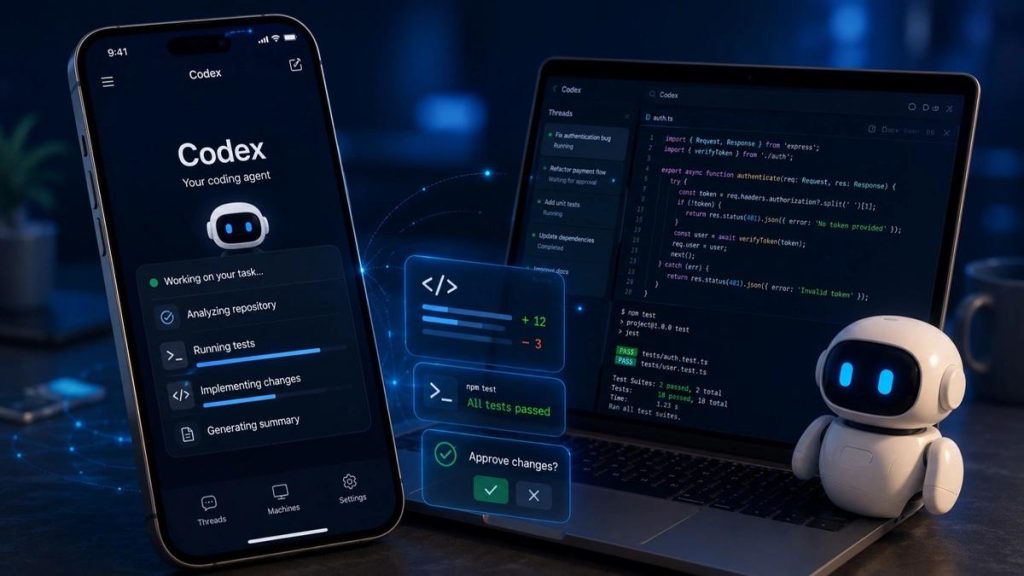
Can You Build an App Using AI?
Absolutely!
AI has become one of the most useful tools for modern application development. You no longer need to write every line of code yourself or understand every programming language to begin building an application.
AI-powered development tools can help you:
Turn an idea into an application plan.
Generate programming code.
Design application screens.
Create database structures.
Build login and registration functionality.
Troubleshoot programming errors.
Improve existing features.
Add new functionality.
Generate documentation.
For example, you could describe an application that helps golfers track their scores, analyze their performance, and monitor their progress.
An AI assistant can help break that idea into individual features, generate code, create database structures, and guide you through the development process.
You still need to test the application and review the generated code, but AI can significantly reduce the amount of manual development required.
Best AI Tools for Building an App
There are several tools available that make affordable app development possible. The best choice depends on whether you want to build a mobile application, a web application, or both.
ChatGPT can act as an AI development assistant throughout the entire app-building process.
You can explain your idea in everyday language and ask it to help create the application structure, write code, design screens, troubleshoot errors, and develop new features.
It is particularly useful for beginners who need guidance throughout the development process.
Cursor is an AI-powered code editor that helps developers write, modify, and understand programming code.
It can work with an existing project, generate new functionality, identify errors, and help you make changes across multiple files.
It’s a useful option for people who want more control over their application without manually writing every line of code.
FlutterFlow is a visual application development platform that allows you to build mobile and web applications with a drag-and-drop interface.
It is particularly useful for creating applications for both Apple and Android devices.
You can visually design screens, connect databases, configure actions, and integrate various services.
Bubble is a no-code platform designed primarily for building web applications.
It offers visual development tools for creating user accounts, databases, workflows, dashboards, and complex application functionality without traditional programming.
These platforms provide backend services that applications need to operate.
They can handle user authentication, databases, file storage, and other important functionality.
Instead of building an entire backend from scratch, you can connect your application to these services.
Step-by-Step: How to Build an App Affordably Using AI
If you have never developed an application before, the process might seem overwhelming. However, breaking development into smaller steps makes it much easier.
Step 1: Start With Your App Idea
The first step is deciding what you want your application to accomplish.
You don’t need a complicated idea. Some of the best applications solve everyday problems.
Consider these examples:
A grocery shopping list organizer.
A golf scorekeeping application.
A home service appointment scheduler.
A customer management application.
A fitness tracking application.
A business inventory management tool.
Write down the problem your application will solve and who would benefit from using it.
Step 2: Create a List of Features
Once you have your idea, determine what the application needs to do.
Start with the essential features rather than trying to build everything at once.
For example, a golf scorekeeping application might include:
User registration.
Golfer profiles.
Golf course selection.
Score entry for each hole.
Automatic score calculations.
Previous round history.
Performance statistics.
Additional features, such as AI-powered swing analysis or advanced performance tracking, could be added later.
This approach keeps development costs manageable and allows you to get a working application into users’ hands sooner.
Step 3: Use AI to Generate Your Application
This is where AI-assisted development becomes especially valuable.
You can use ChatGPT to help write the code needed to build your application.
Start by explaining your idea in detail. Ask AI to break the project into development stages and recommend the appropriate programming languages, frameworks, and services.
You can then work through each feature individually.
For example, you might ask AI to:
Build the application’s home screen.
Create a user registration system.
Connect the application to a database.
Add a form for entering information.
Create a dashboard.
Fix errors in existing code.
Instead of trying to build the entire application in one step, develop and test each component before moving forward.
Step 4: Design a Professional User Interface
Your application’s appearance is important.
Users expect modern applications to be visually appealing, easy to navigate, and simple to understand.
You can use AI to help generate design concepts, color combinations, screen layouts, and navigation structures.
Tools like Figma and FlutterFlow can help turn those designs into functional application screens.
Focus on creating an experience that makes it easy for users to accomplish what they downloaded your app to do.
Step 5: Connect a Database
Most applications need a way to store information.
A database allows your application to save user accounts, preferences, transactions, scores, appointments, and other information.
Platforms like Firebase and Supabase make this process much easier.
AI can also help you design the database and write the code needed to connect it to your application.
Step 6: Test Your Application
Before releasing your app, test it thoroughly.
Make sure all buttons, forms, calculations, and other features work correctly.
Test the application on different devices and screen sizes. Check that information saves properly and that users can navigate between screens without problems.
AI can help identify programming errors, but real-world testing is still essential.
Step 7: Launch Your Application
Once your application is ready, you can prepare it for release.
For iPhone applications, you’ll generally submit through Apple’s App Store Connect.
For Android applications, you’ll use Google Play Console.
You will need an application icon, screenshots, a description, privacy information, and any required permissions.
You should also plan for ongoing maintenance, updates, and customer support after launch.
Affordable App Development for Small Businesses
Custom applications aren’t just for large corporations or technology startups.
Small businesses can benefit from affordable app development in many ways.
A custom application can help automate everyday tasks, improve customer service, organize information, and create additional revenue opportunities.
Consider some examples:
Home Service Businesses: Create an application that allows customers to request appointments, receive estimates, and track service requests.
Restaurants: Develop an ordering application with online menus, pickup scheduling, and customer loyalty features.
Retail Businesses: Build an application for inventory tracking, customer accounts, and order management.
Golf Courses: Create a golf application with tee time scheduling, scorekeeping, and course information.
Professional Services: Develop a customer portal where clients can schedule appointments, access documents, and communicate with your business.
A custom app doesn’t necessarily need hundreds of features. Even a relatively simple application can provide significant value when it solves a specific business problem.
Should You Hire an App Developer or Build It Yourself?
The answer depends on your experience, budget, and the complexity of your project.
Building an application yourself using AI can save money and give you complete control over the development process.
However, there are situations where professional assistance makes sense.
Consider hiring an experienced developer when:
Your application requires complex functionality.
You need advanced security features.
Your project involves sensitive customer information.
You require complex payment processing.
You need extensive integrations.
You don’t have time to manage development.
A hybrid approach is another option. You can use AI to create an initial version of your application and hire a developer to review, improve, and prepare it for launch.
This can help reduce overall development costs while still providing professional oversight.
How to Keep App Development Costs Down
If you’re working with a limited budget, there are several ways to avoid unnecessary expenses.
Start Small: Build only the essential features needed to make your application useful.
Use AI Assistance: Take advantage of AI tools to help with coding, debugging, and development planning.
Choose Affordable Backend Services: Services like Firebase and Supabase can eliminate the need to build expensive server infrastructure.
Avoid Unnecessary Features: Don’t spend money developing features before you know whether users actually need them.
Test Early: Finding problems during development is generally less expensive than fixing them after launch.
Plan for Growth: Choose development tools that allow you to expand your application as your user base grows.
Final Thoughts: Building an App Is More Affordable Than Ever
The cost and complexity of application development have changed dramatically.
What once required a large development team and a substantial budget can now be approached with AI-assisted coding, no-code platforms, and affordable cloud services.
Whether you’re an entrepreneur with a new business idea, a small business owner looking to automate operations, or someone who simply wants to create a useful mobile application, there are more opportunities than ever to get started.
You don’t need to know everything about programming before taking the first step. You need a good idea, a clear plan, and the right development tools.
Have an app idea? Start exploring what’s possible with affordable, AI-powered app development today.
Contact hour23design today to learn more.