

How Google Analytics Works
If you own a business website, one of the most important things you can do is understand how people are using it. How many people visit your website? Where do they come from? Which pages do they look at? Are they contacting you, making purchases, or simply leaving?
These are the kinds of questions that Google Analytics can answer.
Google Analytics is a free website analytics tool that helps business owners understand what is happening behind the scenes of their websites. Instead of guessing whether your website is performing well, you can use real data to make better decisions about your online presence.
In this guide, we’ll explain how Google Analytics works, what information it collects, and why it is an important tool for businesses of all sizes.
What Is Google Analytics?
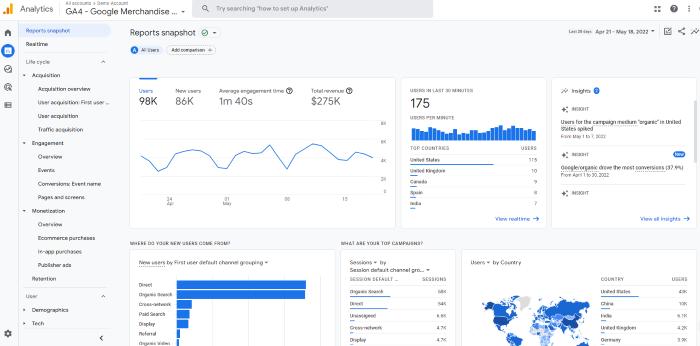
Google Analytics 4 (GA4) is Google’s website and app tracking platform. It collects information about how visitors interact with your website and organizes that information into reports you can review.
Think of it as a digital scoreboard for your website.
Just as a retail store tracks sales, inventory, and customer activity, Google Analytics tracks website activity. It helps you understand:
How many people visit your website.
Where your visitors are located.
How people find your website.
Which pages receive the most attention.
How long visitors engage with your content.
Whether visitors complete important actions, such as submitting a contact form or making a purchase.
The best part? You can access much of this information without paying for an expensive analytics platform.
How Does Google Analytics Actually Work?
You might be wondering how Google knows what people are doing on your website.
The process is relatively simple.
Google Analytics works by placing a small piece of tracking code on your website. This code is commonly installed through Google Analytics directly or through Google Tag Manager.
When someone visits your website, the tracking code runs in their browser and sends information about certain interactions to Google Analytics.
Here’s how the process works:
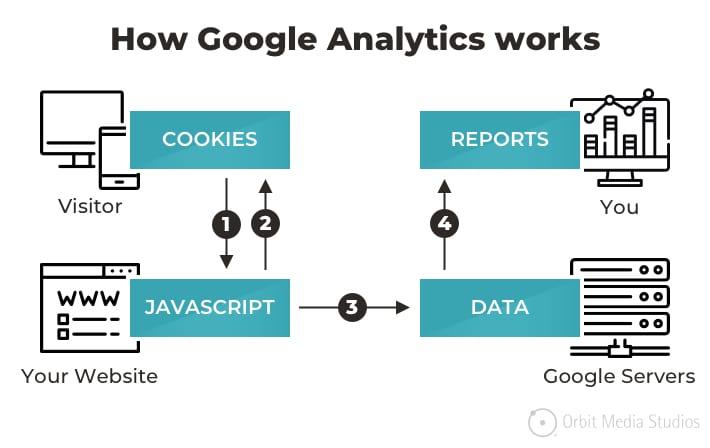
Step 1: Someone visits your website.
A potential customer clicks a link, searches for your business on Google, or types your website address into their browser.
Step 2: Google Analytics collects activity data.
The tracking code records eligible events, such as a page view, scroll, button click, or form submission, depending on your setup and consent settings.
Step 3: Information is sent to Google Analytics.
The collected event information is transmitted to Google’s analytics systems for processing.
Step 4: Google organizes the information into reports.
Your website activity is presented in dashboards and reports that help you understand visitor behavior.
Step 5: You use the information to improve your website.
You can identify popular pages, discover opportunities to improve underperforming content, and determine which marketing efforts are bringing visitors to your website.
It’s important to understand that Google Analytics does not simply record every action a visitor takes automatically. Some interactions are tracked through enhanced measurement, while others require additional configuration.
What Information Does Google Analytics Track?
Google Analytics provides several types of information that can help you understand your website’s performance.
Here are some of the most useful metrics for business owners.
1. Website Visitors
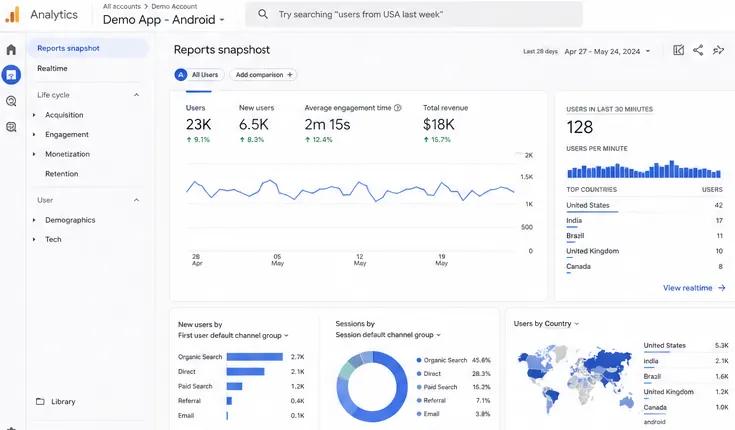
One of the first things most business owners want to know is how many people are visiting their website.
Google Analytics provides several related measurements:
Users: The number of distinct users Google Analytics identifies during a selected period.
Sessions: Groups of interactions that take place during a visit.
Views: The number of times website pages or app screens are viewed.
New users: Users who have not previously been identified by Analytics.
These numbers help you understand whether your website traffic is growing, declining, or staying consistent.
For example, if your website receives 1,500 users per month and increases to 2,200 users the following month, that’s a good indication that more people are discovering your business.
2. Where Your Website Visitors Come From
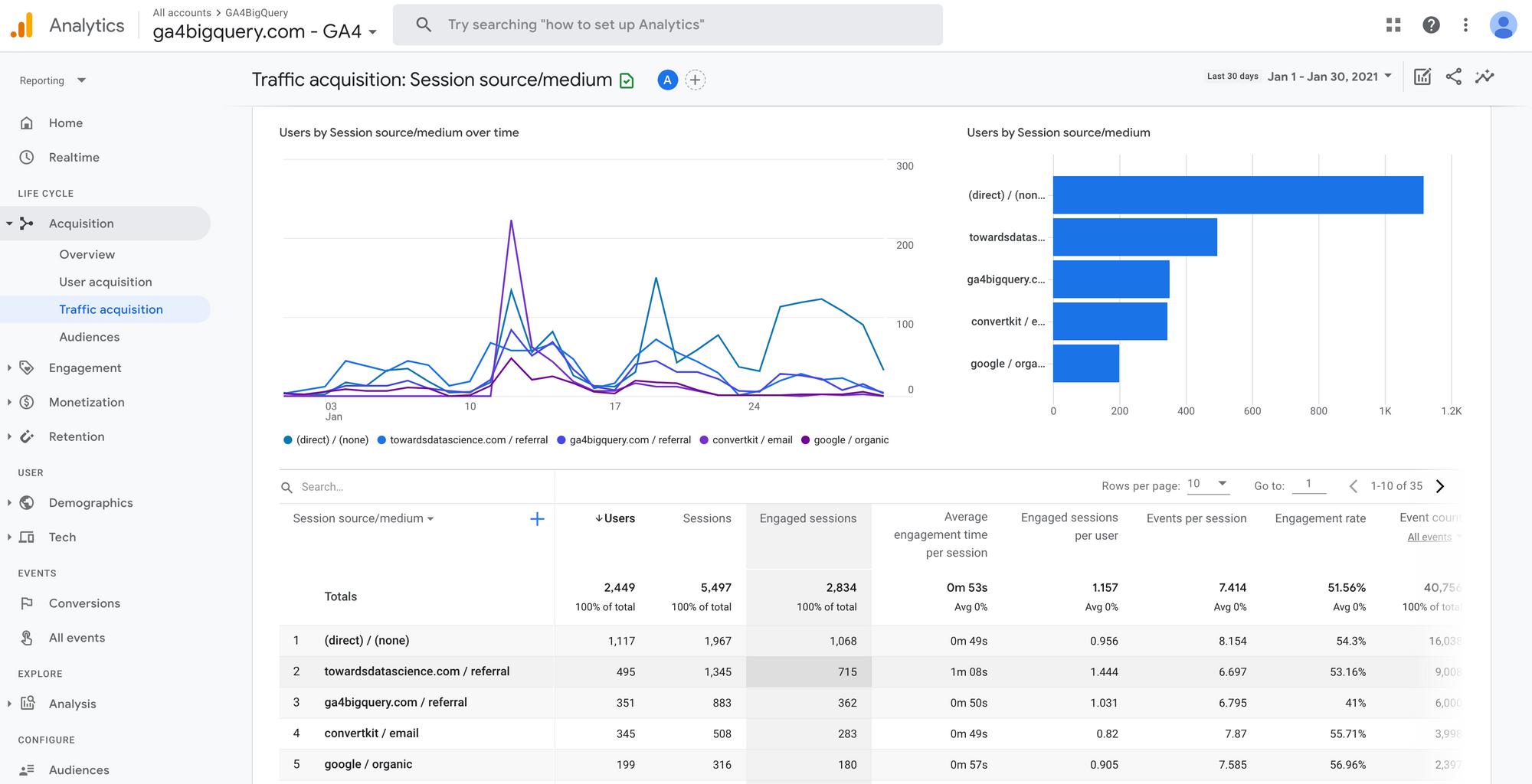
Knowing how people find your website is just as important as knowing how many people visit it.
Google Analytics can help identify different traffic sources, including:
Organic Search: Visitors who find your website through unpaid search engine results, such as Google.
Direct Traffic: Visitors who arrive without a clearly identified referring source.
Referral Traffic: Visitors who click links to your website from other websites.
Organic Social: Visitors who find your website through unpaid social media links.
Paid Search: Visitors who click paid search advertisements.
Email: Visitors who arrive through tracked email campaigns.
This information is extremely valuable when deciding where to spend your marketing budget.
For example, if you are investing time in Facebook marketing but most of your website traffic comes from Google searches, you may want to focus more attention on search engine optimization (SEO).
3. Which Website Pages People Visit
Google Analytics can show you which pages are getting the most attention.
For example, a local home improvement company might discover that its visitors frequently view:
Homepage
Kitchen Remodeling
Bathroom Remodeling
Project Gallery
Contact Page
This information helps you understand what potential customers are interested in.
If one particular service page receives significantly more traffic than others, you might consider adding more information, photos, customer testimonials, or a stronger call to action.
4. Where Your Visitors Are Located
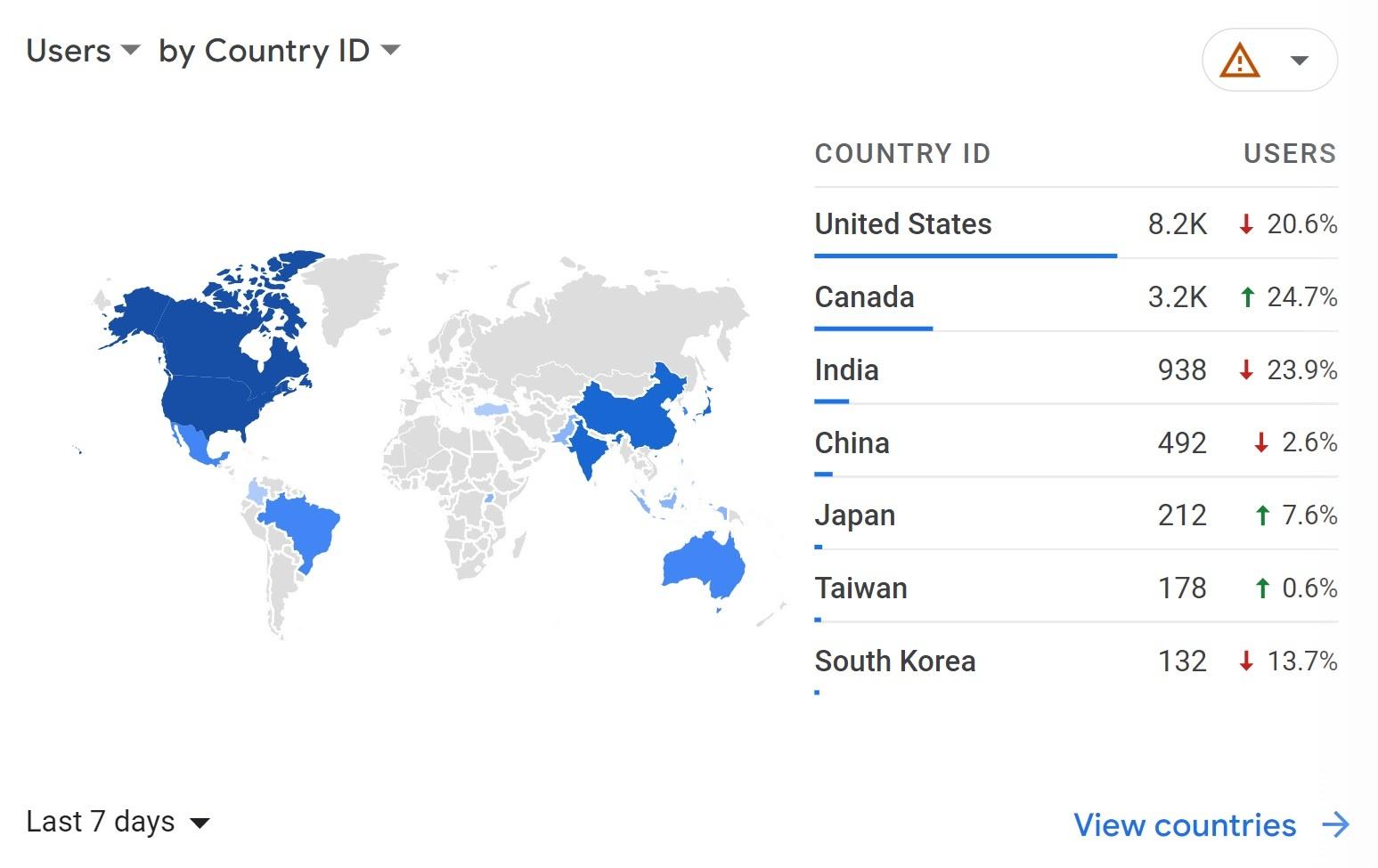
Google Analytics can provide geographic information about your website visitors, including countries, regions, and cities.
This can be particularly useful for local businesses.
Imagine you own a landscaping company in North Myrtle Beach, South Carolina. You want to attract customers from:
North Myrtle Beach
Little River
Cherry Grove
Myrtle Beach
Calabash, North Carolina
Google Analytics can help you see whether your website is attracting visitors from these areas.
This information can help you evaluate your local SEO strategy and determine whether your website is reaching the right audience.
Keep in mind that geographic information is approximate and may not identify every visitor’s exact location.
5. How Visitors Interact With Your Website
Google Analytics 4 uses an event-based tracking system.
This means it tracks individual interactions rather than relying exclusively on traditional pageview measurements.
Examples of events include:
Page views
Scroll activity
Outbound link clicks
File downloads
Video engagement
Form submissions
Button clicks
Some events are collected automatically or through enhanced measurement. Others need to be configured.
For example, you could set up an event that records every time someone clicks the “Request a Free Quote” button on your website.
This helps you measure more than just traffic. It helps you understand whether visitors are taking meaningful actions.
What Are Conversions in Google Analytics?
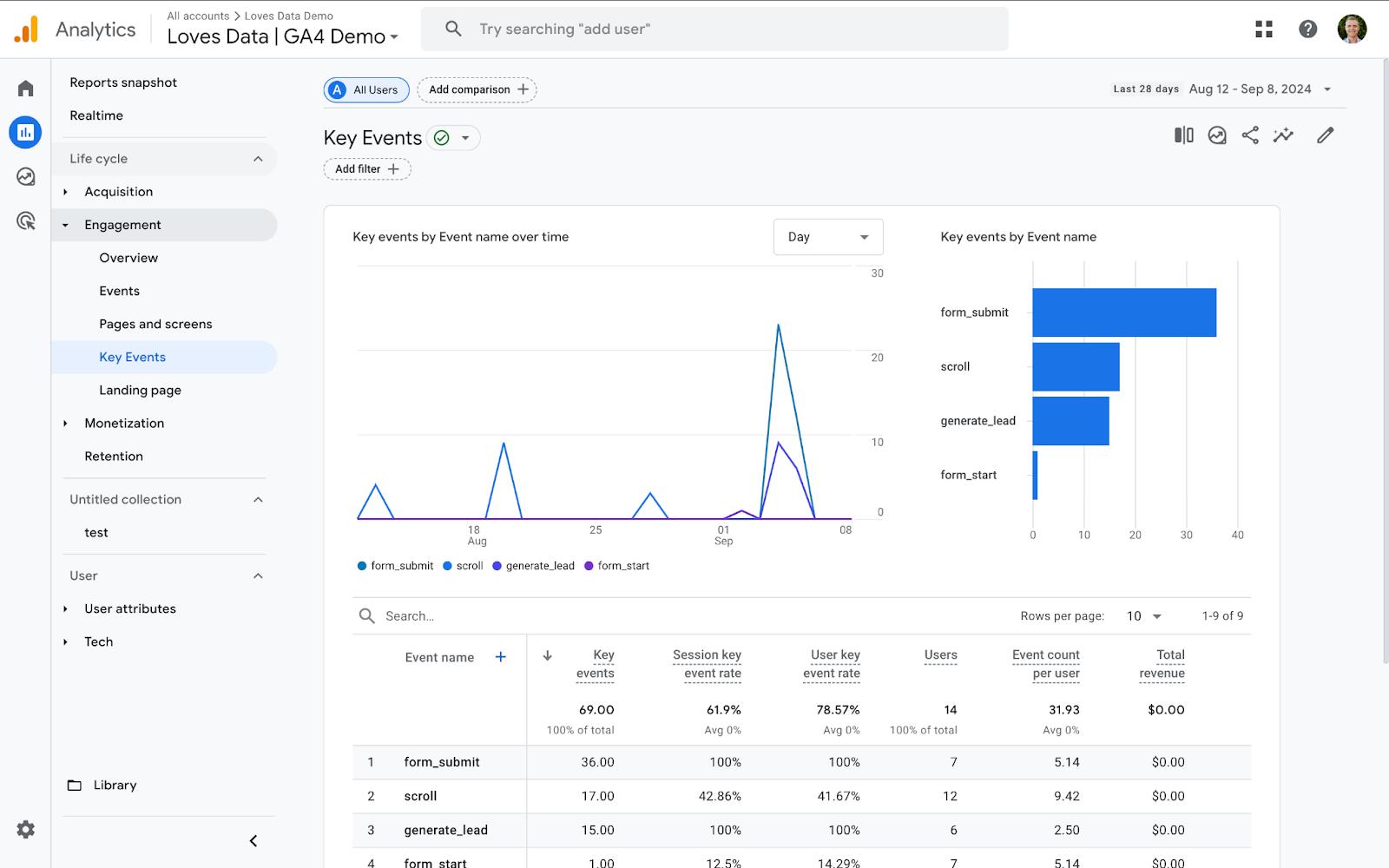
One of the most important features of Google Analytics is its ability to measure conversions.
A conversion is an important action that you want a website visitor to complete. In GA4, these are configured using key events.
Depending on your business, conversions might include:
Submitting a contact form.
Requesting a quote.
Making an online purchase.
Calling your business.
Scheduling an appointment.
Signing up for an email newsletter.
For example, imagine your website receives 1,000 visitors in one month.
Out of those visitors:
100 visit your services page.
50 visit your contact page.
20 submit a contact form.
You now have useful information about how your website is generating potential customers.
Rather than simply celebrating 1,000 visitors, you can focus on how many of those visitors are becoming actual leads.
This is where website analytics becomes a valuable business tool.
How Do You Install Google Analytics on Your Website?
Getting started with Google Analytics is easier than many people think.
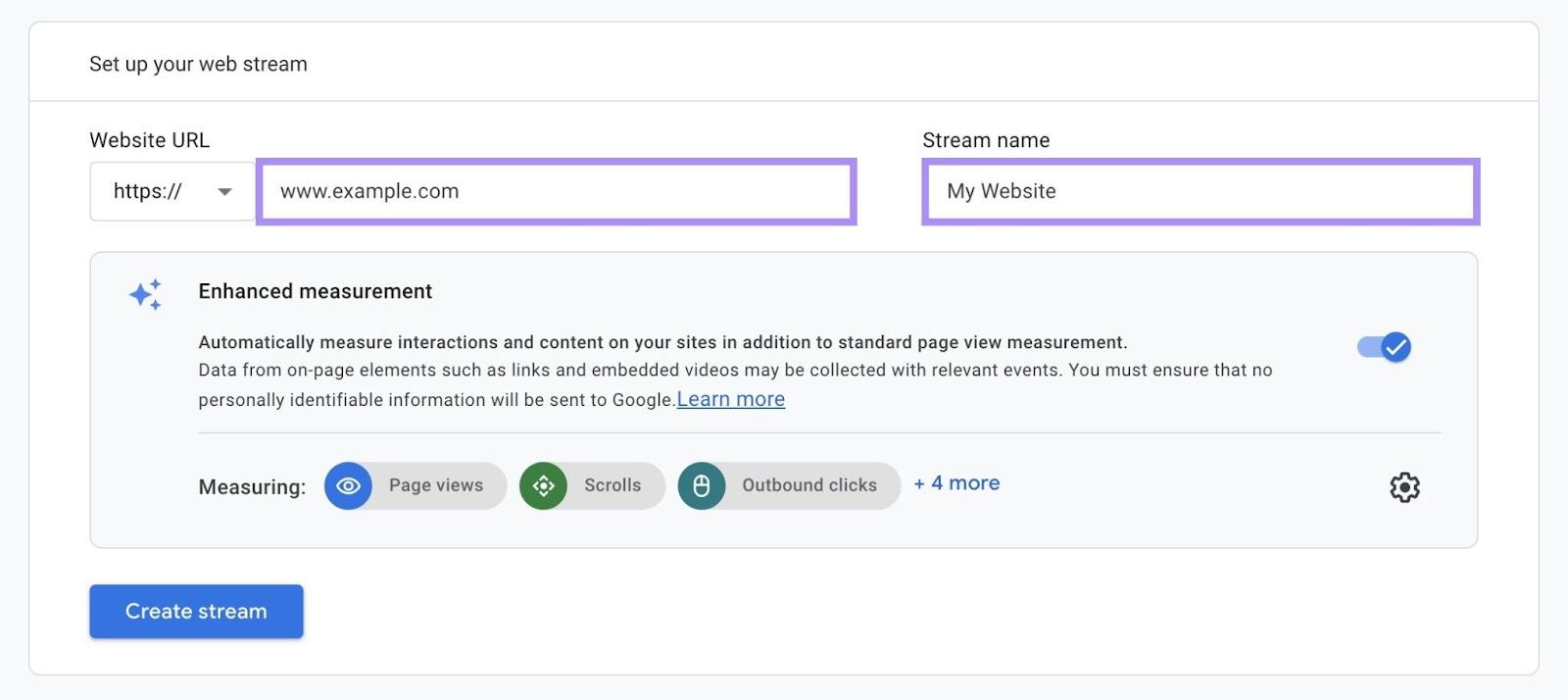
Here are the basic steps:
Step 1: Create a Google Analytics account
Visit Google Analytics and sign in using your Google account.
Step 2: Create an Analytics property
Enter your business or website name and configure your reporting time zone and currency.
Step 3: Set up a web data stream
Enter your website address and create a web data stream. Google will provide a measurement ID and installation instructions.
Step 4: Install the tracking code
Add the Google tag to your website. Depending on your platform, you may be able to install it through:
WordPress plugins.
Shopify integrations.
Website builder integrations.
Google Tag Manager.
Direct installation in your website’s code.
Step 5: Verify that tracking works
Visit your website and check the Realtime report in Google Analytics to confirm that activity is being received.
You should also verify that your privacy and consent settings are properly configured.
Google Analytics and Google Search Console: What's the Difference?
Google Analytics
Measures what visitors do after arriving at your website.
Google Search Console
Measures how your website performs in Google Search.
These two tools work extremely well together, but they serve different purposes.
Google Analytics | Search Console |
|---|---|
Tracks website visitors | Tracks Google search performance |
Measures user interactions | Measures search impressions |
Tracks conversions | Tracks search clicks |
Shows traffic sources | Shows search queries |
Measures engagement | Identifies indexing issues |
For example, Search Console might tell you that 500 people clicked on your website from Google search results.
Google Analytics can help you understand what those visitors did after arriving.
Both tools are free and should be part of your website management strategy.
Why Is Google Analytics Important for Small Businesses?
You don’t need to operate a large company to benefit from website analytics.
In fact, small businesses can gain a significant advantage by understanding how their websites perform.
Here are five reasons every small business should consider using Google Analytics.
1. Understand Your Customers
Learn what potential customers are interested in and which services they are researching.
2. Improve Your Marketing Strategy
Identify which marketing channels are sending visitors to your website so you can make smarter marketing decisions.
3. Improve Your Website
Discover which pages are performing well and which pages may need better content, design, or navigation.
4. Generate More Leads
Track important actions such as quote requests, contact forms, and appointment bookings.
5. Measure Your Return on Investment
If you’re spending money on advertising, SEO, or website development, analytics can help you understand whether those investments are producing results.
Do You Need to Check Google Analytics Every Day?
Not necessarily.
For most small businesses, reviewing website analytics once a week or once a month is a reasonable starting point.
The important thing is to look for trends rather than obsessing over daily fluctuations.
Consider reviewing these numbers regularly:
Total website users.
Traffic from organic search.
Most popular website pages.
Geographic location of visitors.
Engagement and interaction activity.
Number of leads or conversions.
Over time, these numbers can help you identify opportunities to grow your online presence.
Is Google Analytics Free?
Yes! Google Analytics 4 offers a free version that is more than sufficient for most small businesses.
There is also a paid enterprise version called Google Analytics 360, designed for organizations with more advanced analytics requirements.
For most local businesses, the free version provides everything needed to monitor website traffic, understand visitor behavior, and measure marketing performance.
One important consideration is privacy. Businesses should configure their analytics implementation to comply with applicable privacy laws and consent requirements. Google Analytics is not intended to collect personally identifiable information such as names, email addresses, or phone numbers.
Final Thoughts: Stop Guessing and Start Measuring
Your website is more than an online business card. It is a marketing tool that can help attract customers, generate leads, and grow your business.
But how do you know whether it’s actually working?
That’s where Google Analytics comes in.
By understanding where visitors come from, what pages they view, and what actions they take, you can make informed decisions about your website and marketing strategy.
You don’t have to be a technical expert to benefit from website analytics. Even a basic understanding of your website traffic can help you make better business decisions.
A successful website isn’t just about getting visitors. It’s about turning those visitors into customers.
Need Help Getting More From Your Business Website?
At hour23design, we believe every business website should have a purpose. Whether you need a new website, help improving your existing site, or assistance setting up Google Analytics and conversion tracking, having the right tools in place makes all the difference.
We help small businesses build professional websites designed to attract visitors, improve their online visibility, and generate new business.
Contact hour23design to learn how we can help your business grow online.


