
Demystifying Web Design Terms
If you’ve ever talked to a web designer, developer, or digital marketing professional, you’ve probably heard terms like SEO, hosting, domain names, responsive design, and CMS. While these terms might sound technical, they’re actually pretty simple once you understand what they mean.
Whether you’re building your first business website, updating an existing one, or simply trying to understand how the internet works, knowing a few basic web design terms can help you make better decisions for your business.
Let’s break down some of the most common website terms in plain English.
1. Domain Name
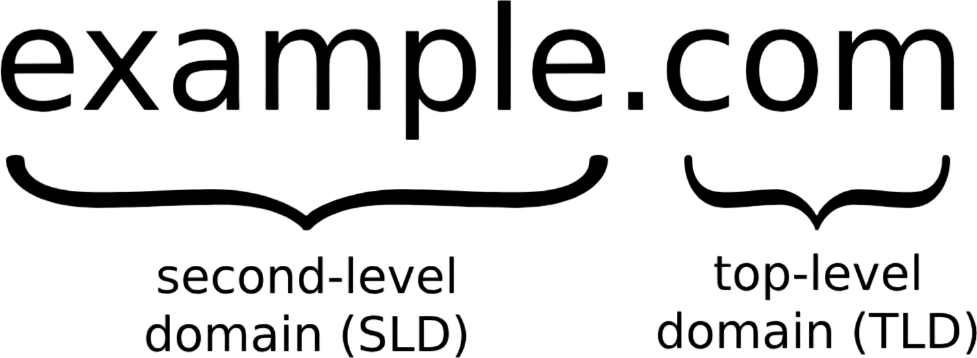
Your domain name is your website’s address on the internet. It’s what people type into their browser to find your business.
For example:
yourbusiness.com
Think of your domain name like your business’s street address. Without it, customers wouldn’t know where to find you online.
Why it matters: A professional domain name makes your business easier to find, helps build credibility, and gives your website a recognizable identity.
2. Web Hosting
If your domain name is your website’s address, web hosting is the land where your website lives.
A hosting company stores your website’s files, images, and information on a server so people can access your website whenever they visit your domain.
Why it matters: Reliable hosting helps keep your website online, improves loading speeds, and provides the resources needed to run your website smoothly.
3. SSL Certificate (HTTPS)
Ever notice the little padlock icon next to a website address? That’s an indication that the website uses an SSL certificate.
SSL stands for Secure Sockets Layer. It helps encrypt information traveling between a visitor’s browser and your website.
You’ll often see websites using HTTPS instead of HTTP.
Why it matters: SSL helps protect sensitive information, builds visitor confidence, and is an important part of website security. Google also uses HTTPS as a lightweight ranking signal.
4. SEO (Search Engine Optimization)
SEO is the process of improving your website so it has a better chance of appearing in search engine results when people search for products or services you offer.
For example, if you own a roofing company in Myrtle Beach, you want your website to appear when someone searches for “roofing company in Myrtle Beach.”
SEO involves several things, including:
Using relevant keywords throughout your website.
Creating helpful and informative content.
Improving website loading speed.
Optimizing page titles and descriptions.
Building quality links from other websites.
Making your website easy for search engines to understand.
Why it matters: Good SEO helps potential customers discover your business without relying entirely on paid advertising.
5. Responsive Design
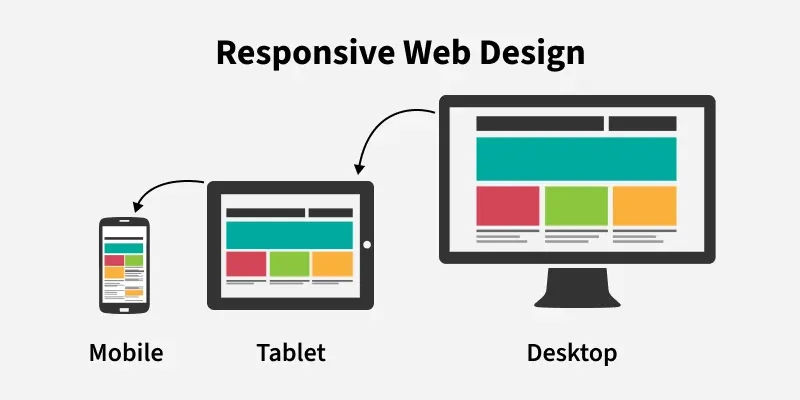
Responsive design means your website automatically adjusts to fit the screen it’s being viewed on.
Whether someone visits your website using a desktop computer, laptop, tablet, or smartphone, the layout should adjust to provide a good experience.
Why it matters: More people browse the internet on mobile devices than ever before. A website that doesn’t work properly on smartphones can drive potential customers away.
6. CMS (Content Management System)
A CMS is software that allows you to create, edit, and manage website content without having to write code.
Popular examples include:
Think of a CMS as the control panel for your website. It allows you to update text, upload pictures, publish blog articles, and manage other content.
Why it matters: A CMS makes it easier to keep your website current without needing a developer every time you want to make a small change.
7. Backend vs. Frontend
These two terms describe different parts of a website.
Frontend: This is everything visitors see and interact with. It includes the layout, colors, images, menus, buttons, and text.
Backend: This is the behind-the-scenes part of a website. It handles things like databases, user accounts, forms, and other functionality.
Think of a restaurant. The frontend is the dining room where customers enjoy their experience. The backend is the kitchen where everything gets prepared.
Both are important for a successful website.
8. URL (Uniform Resource Locator)
A URL is simply the complete web address of a specific page or resource on the internet.
For example:
The domain name identifies your website, while the rest of the URL directs visitors to a particular page.
Why it matters: Clear, organized URLs make it easier for visitors and search engines to understand your website’s structure.
9. CTA (Call to Action)
A CTA is a button, link, or message that encourages visitors to take a specific action.
Common examples include:
Schedule an Appointment
Shop Now
Learn More
Why it matters: Your website shouldn’t just provide information. It should encourage visitors to become customers. Effective calls to action help guide visitors toward the next step.
10. Website Traffic
Website traffic refers to the number of visitors coming to your website.
Traffic can come from several sources:
Organic search (unpaid search engine results).
Paid advertising.
Social media.
Direct visits (typing your web address into a browser).
Referral links from other websites.
Why it matters: Understanding where your visitors come from can help you determine which marketing efforts are working and where you should focus your attention.
11. Analytics
Website analytics refers to collecting and analyzing information about how people use your website.
Tools like Google Analytics can help you understand:
How many people visit your website.
Which pages receive the most attention.
How visitors find your website.
How long people stay on your site.
Whether visitors complete important actions.
Why it matters: Analytics helps you make informed decisions instead of guessing what is or isn’t working.
12. Landing Page
A landing page is a specific page designed to encourage visitors to take one particular action.
For example, a landscaping company running a Google advertising campaign might create a landing page specifically promoting its lawn maintenance services.
Unlike a typical homepage, a landing page usually focuses on one offer, service, or goal.
Why it matters: A well-designed landing page can turn advertising clicks into phone calls, quote requests, and new customers.
13. Bandwidth
Bandwidth refers to the amount of data that can be transferred between your website and its visitors over a given period.
Every time someone visits your website, their device downloads information such as images, videos, and website files.
Why it matters: Websites with lots of visitors or large media files may require more bandwidth. Having adequate bandwidth helps prevent performance problems as your website grows.
14. Cache (Caching)
Caching is a process that temporarily stores copies of website files so they can load faster the next time someone visits.
Instead of downloading everything from scratch, a browser or server can reuse previously stored information.
Why it matters: Caching can significantly improve website speed and create a better experience for visitors.
15. API (Application Programming Interface)
An API allows different software applications to communicate with each other.
For example, your website might use an API to connect with:
A payment processing service.
A scheduling application.
A shipping provider.
A customer relationship management (CRM) system.
Why it matters: APIs allow your website to integrate with other tools and provide functionality beyond basic pages and content.
16. Ecommerce
Ecommerce simply means buying and selling products or services online.
An ecommerce website allows customers to browse products, add items to a shopping cart, and complete purchases through an online checkout system.
Platforms like Shopify and WooCommerce make it possible for businesses of all sizes to sell online.
Why it matters: Ecommerce gives businesses the opportunity to reach customers beyond their physical location and generate sales around the clock.
17. Website Maintenance
Website maintenance involves keeping your website updated, secure, and functioning properly.
This can include:
Updating software and plugins.
Fixing broken links.
Checking website forms.
Backing up website files.
Monitoring security.
Updating content and images.
Why it matters: A website isn’t something you build once and forget about. Regular maintenance helps prevent problems and keeps your online presence professional.
18. Conversion Rate
A conversion happens when a website visitor completes an action you want them to take.
That might mean making a purchase, submitting a contact form, calling your business, or signing up for a newsletter.
Your conversion rate is the percentage of visitors who complete that action.
For example, if 100 people visit your website and 5 request a quote, your conversion rate is 5%.
Why it matters: Getting website visitors is important, but turning those visitors into paying customers is what really makes your website valuable.
19. Meta Title and Meta Description
These are pieces of information that help describe a webpage to search engines and potential visitors.
The meta title is typically the clickable headline shown in search results. The meta description is the short summary that may appear underneath it.
Why it matters: Well-written titles and descriptions can help search engines understand your content and encourage people to click through to your website.
20. Domain Email
A domain email is an email address that uses your business’s domain name instead of a generic email provider.
For example:
info@yourbusiness.com
sales@yourbusiness.com
support@yourbusiness.com
Why it matters: A professional business email address helps establish credibility and creates a more consistent brand image.
Understanding Web Design Terms Can Make You a Smarter Business Owner
You don’t need to become a web developer to have a successful website. However, understanding basic web design terms can make it easier to communicate with designers, evaluate services, and make informed decisions about your online presence.
Your website is one of your business’s most important marketing tools. Understanding how it works puts you in a better position to make sure it’s doing its job.
Need help building or improving your business website?
At hour23design, we help businesses create professional, affordable websites that look great, work across all devices, and help attract new customers. Whether you need a brand-new website, a redesign, or help improving your online visibility, we’re here to help.
Contact hour23design to learn more about our web design and development services.